Showing newest 4 of 17 posts from February 2010. Show older posts

Sunday, February 28, 2010

Shatranj – Convert to Control (3 of 3): TemplateBinding, Styles & Triggers


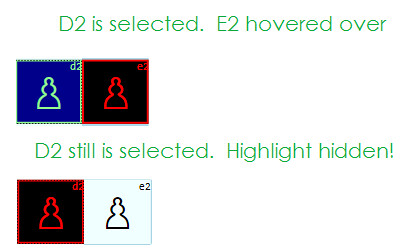
So we’ve a background color issue!  Let’s call Snoop to rescue:

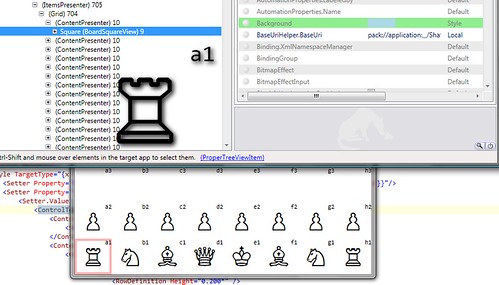
SnoopShowsBackgroundSetByStyleCorrectly

Snoop shows that the background of square is – correctly – set to LightBlue by Style!  Still it doesn’t show up on the UI.  That’s simple, because any property not set by Template is replaced by the defaults!

Since I couldn’t figure out how to set the Background on the RadioButton from within ControlTemplate, the best thing I could do was:

<Grid

      Background="{Binding Path=Background,

      RelativeSource={RelativeSource Mode=FindAncestor,

      AncestorType={x:Type Shatranj:BoardSquareView}}}"

>

It worked!  Then:

<Grid Background="{TemplateBinding Background}">

One problem down!  Let’s refactor the code to distinguish between two players.  Their squares must belong to different groups so they can be selected independently.

Let’s refactor the code to distinguish between two players.  Their squares must belong to different groups so they can be selected independently:

    1 <RadioButton x:Class="Shatranj.BoardSquareView" 

    2             xmlns="http://schemas.microsoft.com/winfx/2006/xaml/presentation"

    3             xmlns:x="http://schemas.microsoft.com/winfx/2006/xaml"

    4             xmlns:Shatranj="clr-namespace:Shatranj" >

    5 

    6     <RadioButton.Resources>

    7         <Shatranj:ForceToGroupNameConverter x:Key="ForceToGroupNameConverter"/>


Remember, each BoardSquareView has its DataContext set to a “BoardSquare” object.  BoardSquare object among other things has a CurrentPiece property (of type ChessPiece), which in turn has a property called ‘Force’:


ChessPieceSquare


ForceToGroupNameCoverter.cs has three pertinent lines:


   16             var square = value as BoardSquare;

   17             if(square == null || square.CurrentPiece == null) return "None";

   18             return Enum.GetName(typeof (Army), square.CurrentPiece.Force);

This divides the whole board into three groups.  One with White pieces, one with Black pieces and one another with no pieces (Grouped into ‘None’).

  1. When it’s a player’s turn (playing White/Black), the player should only be able to select one of his/her piece for making the move
  2. This also applies to the opponent
  3. When any of the empty squares are captured by either players, that square is owned by the piece occupying it.

Here’s the final version:

    1 <RadioButton x:Class="Shatranj.BoardSquareView" 

    2             xmlns="http://schemas.microsoft.com/winfx/2006/xaml/presentation"

    3             xmlns:x="http://schemas.microsoft.com/winfx/2006/xaml"

    4             xmlns:Shatranj="clr-namespace:Shatranj" >

    5     <RadioButton.Resources>

    6         <Shatranj:ForceToGroupNameConverter x:Key="ForceToGroupNameConverter"/>

    7         <Style TargetType="{x:Type Shatranj:BoardSquareView}">

    8             <Setter Property="IsChecked" Value="false"/>

    9             <Setter Property="Background" Value="{Binding Converter={StaticResource LocationToColorConverter}, Mode=OneWay}"/>

   10             <Setter Property="GroupName" Value="{Binding Converter={StaticResource ForceToGroupNameConverter}}"/>

   11             <Setter Property="Template">

   12                 <Setter.Value>

   13                     <ControlTemplate TargetType="{x:Type Shatranj:BoardSquareView}">

   14                         <ControlTemplate.Resources>

   15                             <Style TargetType="RadioButton">

   16                                 <Setter Property="Background"

   17                                        Value="{Binding Converter={StaticResource LocationToColorConverter}, Mode=OneWay}"/>

   18                             </Style>

   19                             <Shatranj:BoolToVisibilityConverter x:Key="BoolToVisibilityConverter" />

   20                         </ControlTemplate.Resources>

   21 

   22                         <Grid Background="{TemplateBinding Background}">

   23                                 <Grid.RowDefinitions>

   24                                     <RowDefinition Height="0.200*" />

   25                                     <RowDefinition Height="0.800*" />

   26                                 </Grid.RowDefinitions>

   27                                 <Grid.ColumnDefinitions>

   28                                     <ColumnDefinition />

   29                                 </Grid.ColumnDefinitions>

   30                                 <Border x:Name="Border" Grid.Row="0" Grid.Column="0" Grid.RowSpan="2" />

   31                                 <Viewbox Grid.Row="0" Grid.Column="0"

   32                                         HorizontalAlignment="Right" VerticalAlignment="Stretch">

   33                                     <TextBlock FontSize="12"

   34                                               FontFamily="Consolas"

   35                                               Text="{Binding Path=AlgebraicIdentity, Mode=OneWay}" />

   36                                 </Viewbox>

   37                                 <Viewbox Grid.RowSpan="2" Grid.Row="0"

   38                                         HorizontalAlignment="Center" VerticalAlignment="Center">

   39                                     <TextBlock FontFamily="Chess Cases"

   40                                               Margin="3,3,3,3"

   41                                               Text="{Binding Path=CurrentPiece.AltChar, Mode=OneWay}" />

   42                                 </Viewbox>

   43 

   44                                 <Ellipse MaxHeight="30" MaxWidth="30" MinHeight="10" MinWidth="10"

   45                                         Grid.Row="0" Grid.RowSpan="2"

   46                                         Visibility="{Binding IsHit, Converter={StaticResource BoolToVisibilityConverter}}" >

   47                                     <Ellipse.Fill>

   48                                         <SolidColorBrush Color="Black" Opacity="0.5"/>

   49                                     </Ellipse.Fill>

   50                                 </Ellipse>

   51 

   52                             </Grid>

   53 

   54                         <ControlTemplate.Triggers>

   55                                 <Trigger Property="IsChecked" Value="true">

   56                                     <Setter Property="Background" Value="DarkBlue"/>

   57                                     <Setter Property="Foreground" Value="LightGreen" />

   58                                     <Setter TargetName="Border" Property="BorderBrush" Value="LightGreen"/>

   59                                     <Setter TargetName="Border" Property="BorderThickness" Value="2"/>

   60                                 </Trigger>

   61                                 <Trigger Property="IsMouseOver" Value="true">

   62                                     <Setter Property="Foreground" Value="Red" />

   63                                     <Setter Property="Background" Value="Black"/>

   64                                     <Setter TargetName="Border" Property="BorderBrush" Value="Red"/>

   65                                     <Setter TargetName="Border" Property="BorderThickness" Value="2"/>

   66                                 </Trigger>

   67                         </ControlTemplate.Triggers>

   68                     </ControlTemplate>

   69                 </Setter.Value>

   70             </Setter>

   71         </Style>

   72     </RadioButton.Resources>

   73 </RadioButton>

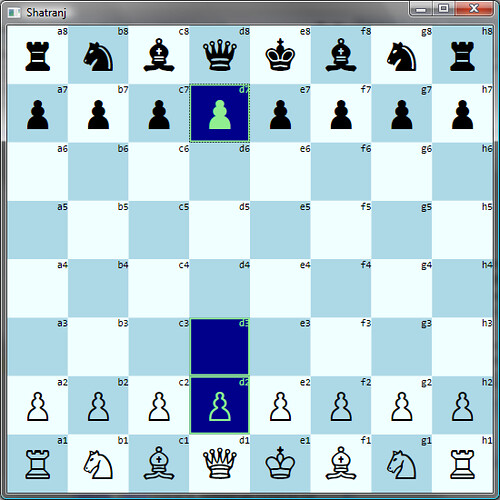
ShatranjChessBoardWithControlTemplate


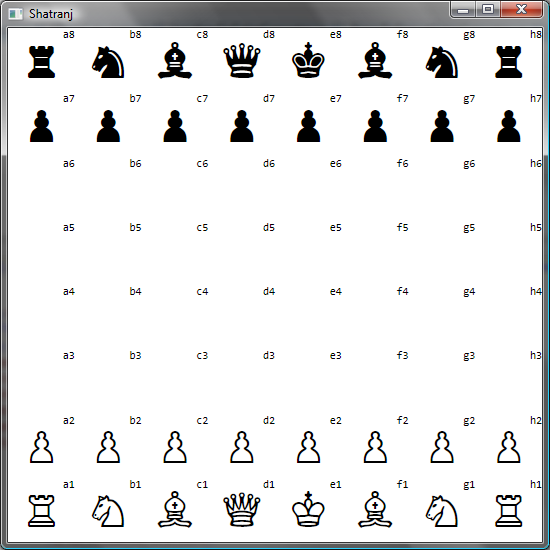
Yes, WPF is nothing short of revolutionary! 

Shatranj – Convert to Control (2 of 3): ControlTemplate to replace default UI

Our first task is to prevent the RadioButton’s default UI from showing up.  Let’s move the ContentPresenter inside Style into a ControlTemplate:

    1 <RadioButton x:Class="Shatranj.BoardSquareView" xmlns="http://schemas.microsoft.com/winfx/2006/xaml/presentation" xmlns:x="http://schemas.microsoft.com/winfx/2006/xaml" xmlns:Shatranj="clr-namespace:Shatranj" Background="{Binding Converter={StaticResource LocationToColorConverter}}">

    2 

    3     <RadioButton.Resources>

    4         <Style TargetType="{x:Type Shatranj:BoardSquareView}">

    5             <Setter Property="Template">

    6                 <Setter.Value>

    7                     <ControlTemplate>

    8                         <ContentPresenter>

    9                             <ContentPresenter.Content>

   10                                 <Grid>

   11                                     <Grid.RowDefinitions>

   12                                         <RowDefinition Height="0.200*" />

   13                                         <RowDefinition Height="0.800*" />

   14                                     </Grid.RowDefinitions>

   15                                     <Grid.ColumnDefinitions>

   16                                         <ColumnDefinition />

   17                                     </Grid.ColumnDefinitions>

   18 

   19                                     <Viewbox Grid.Row="0" Grid.Column="0"

   20                                             HorizontalAlignment="Right" VerticalAlignment="Stretch">

   21                                         <TextBlock FontSize="12"

   22                                                   FontFamily="Consolas"

   23                                                   Text="{Binding Path=AlgebraicIdentity, Mode=OneWay}" />

   24                                     </Viewbox>

   25                                     <Viewbox Grid.RowSpan="2" Grid.Row="0"

   26                                             HorizontalAlignment="Center" VerticalAlignment="Center">

   27                                         <TextBlock FontFamily="Chess Cases"

   28                                                   Margin="3,3,3,3"

   29                                                   Text="{Binding Path=CurrentPiece.AltChar, Mode=OneWay}" />

   30                                     </Viewbox>

   31 

   32                                     <Ellipse MaxHeight="30" MaxWidth="30"

   33                                             MinHeight="10"

   34                                             MinWidth="10"

   35                                             Fill="Aqua"

   36                                             Grid.Row="0" Grid.RowSpan="2"

   37                                             Visibility="{Binding IsHit,

   38                                                Converter={StaticResource BoolToVisibilityConverter}}" />

   39                                 </Grid>

   40                             </ContentPresenter.Content>

   41                         </ContentPresenter>

   42                     </ControlTemplate>

   43 

   44                 </Setter.Value>

   45             </Setter>

   46             <Style.Triggers>

   47                 <Trigger Property="IsMouseOver" Value="true">

   48                     <Setter Property="Foreground" Value="Red" />

   49                     <Setter Property="Background" Value="Black" />

   50                     <Setter Property="BorderBrush" Value="Red" />

   51                     <Setter Property="BorderThickness" Value="2" />

   52                 </Trigger>

   53             </Style.Triggers>

   54         </Style>

   55         <Shatranj:BoolToVisibilityConverter x:Key="BoolToVisibilityConverter" />

   56     </RadioButton.Resources>

   57 </RadioButton>

Oops…  The BoolToVisibilityConverter should also be moved into <ControlTemplate.Resources> so it becomes accessible from inside the ControlTemplate.

    5             <Setter Property="Template">

    6                 <Setter.Value>

    7                     <ControlTemplate>

    8                         <ControlTemplate.Resources>

    9                             <Shatranj:BoolToVisibilityConverter x:Key="BoolToVisibilityConverter" />

   10                         </ControlTemplate.Resources>

   11                         <ContentPresenter>

   12                             <ContentPresenter.Content>

ShatranjWithControlTemplatedBoardSquareView

No color squares?  Strange.  Let’s move the background to Style:

    1 <RadioButton x:Class="Shatranj.BoardSquareView"

    2             xmlns="http://schemas.microsoft.com/winfx/2006/xaml/presentation"

    3             xmlns:x="http://schemas.microsoft.com/winfx/2006/xaml"

    4             xmlns:Shatranj="clr-namespace:Shatranj">

    5 

    6     <RadioButton.Resources>

    7         <Style TargetType="{x:Type Shatranj:BoardSquareView}">

    8             <Setter Property="Background" Value="{Binding Converter={StaticResource LocationToColorConverter}}"/>

Same result!  Well, I would have been surprised if it’d been otherwise.  Local values always override values set by Styles!  So what could be the problem?

Shatranj - Convert to Control (1 of 3): Need for ControlTemplates

Let’s revisit our requirements:

  1. When it’s a player’s turn (playing White/Black), the player should only be able to select one of his/her piece for making the move
  2. This also applies to the opponent
  3. When any of the empty squares are captured by either players, that square is owned by the piece occupying it.

Hmm…  The BoardSquareView is a UserControl!  It doesn’t support Mouse events directly for one.  How good it would be, if it were a button!  No, wait!  Yes, it should be a RadioButton.

WPF lets RadioButtons grouped through the GroupName property.  In the absence of Blend, I’ll have to make do with manually editing XAML to do this.  Just search for UserControl and replace it with RadioButton:

    1 <RadioButton x:Class="Shatranj.BoardSquareView" xmlns="http://schemas.microsoft.com/winfx/2006/xaml/presentation"

    2             xmlns:x="http://schemas.microsoft.com/winfx/2006/xaml" xmlns:Shatranj="clr-namespace:Shatranj"

    3             Background="{Binding Converter={StaticResource LocationToColorConverter}}">

    4 

    5     <RadioButton.Resources>

    6         <Style TargetType="{x:Type Shatranj:BoardSquareView}">

    7             <Style.Triggers>

    8                 <Trigger Property="IsMouseOver" Value="true">

    9                     <Setter Property="Foreground" Value="Red" />

   10                     <Setter Property="Background" Value="Black" />

   11                     <Setter Property="BorderBrush" Value="Red" />

   12                     <Setter Property="BorderThickness" Value="2" />

   13                 </Trigger>

   14             </Style.Triggers>

   15         </Style>

   16         <Shatranj:BoolToVisibilityConverter x:Key="BoolToVisibilityConverter" />

   17     </RadioButton.Resources>

   18 

   19     <ContentPresenter>

   20         <ContentPresenter.Content>

   21             <Grid>

   22                 <Grid.RowDefinitions>

   23                     <RowDefinition Height="0.200*" />

   24                     <RowDefinition Height="0.800*" />

   25                 </Grid.RowDefinitions>

   26                 <Grid.ColumnDefinitions>

   27                     <ColumnDefinition />

   28                 </Grid.ColumnDefinitions>

   29 

   30                 <Viewbox Grid.Row="0" Grid.Column="0" HorizontalAlignment="Right" VerticalAlignment="Stretch">

   31                     <TextBlock FontSize="12" FontFamily="Consolas" Text="{Binding Path=AlgebraicIdentity, Mode=OneWay}" />

   32                 </Viewbox>

   33                 <Viewbox Grid.RowSpan="2" Grid.Row="0" HorizontalAlignment="Center" VerticalAlignment="Center">

   34                     <TextBlock FontFamily="Chess Cases"

   35                               Margin="3,3,3,3"

   36                               Text="{Binding Path=CurrentPiece.AltChar, Mode=OneWay}" />

   37                 </Viewbox>

   38 

   39                 <Ellipse MaxHeight="30" MaxWidth="30"

   40                         MinHeight="10"

   41                         MinWidth="10" Fill="Aqua"

   42                         Grid.Row="0" Grid.RowSpan="2"

   43                         Visibility="{Binding IsHit, Converter={StaticResource BoolToVisibilityConverter}}" />

   44             </Grid>

   45         </ContentPresenter.Content>

   46     </ContentPresenter>

   47 </RadioButton>


Oops…. The results are not encouraging.  We still got the RadioButton’s default UI interfering.  This is a useful behavior when we want to layer multiple levels of controls using inheritance.  At the moment, we need something more heavyweight.  Enter ControlTemplates!


UC2RB

Shatranj – Capture Mouse hover to highlight piece thru Triggers

You can define a Property trigger (Since IsMouseOver is a Dependency Property) (fortunately UserControl has a dependency property IsMouseOver…  IsMouseOver is defined in UIElement).

    <UserControl.Resources>

        <Style TargetType="{x:Type Shatranj:BoardSquareView}">

            <Setter Property="Background" Value="{Binding Converter={StaticResource LocationToColorConverter}}" />

            <Style.Triggers>

                <Trigger Property="IsMouseOver" Value="true">

                    <Setter Property="Foreground" Value="Red" />

                    <Setter Property="Background" Value="Black" />

                    <Setter Property="BorderBrush" Value="Red"/>

                    <Setter Property="BorderThickness" Value="2"/>

                </Trigger>

            </Style.Triggers>

        </Style>

        <Shatranj:BoolToVisibilityConverter x:Key="BoolToVisibilityConverter" />

    </UserControl.Resources>

Queen's Gambit

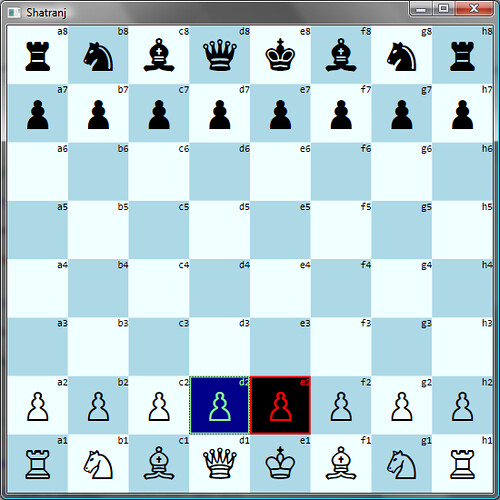
The next step is to capture the Click.  So, we can have a different colours to indicate selection:

Queen2KingGambit

A search of UserControl using Object Explorer (in VS2008) quickly reveals there’s no dependency property for mouse clicks.  Since there’s a ContentPresenter in the BoardSquareView usercontrol – which exposes MouseUp/Down as events, it could be captured in code-behind thus:

    <ContentPresenter MouseUp="ContentPresenter_MouseUp">

        private void ContentPresenter_MouseUp(object sender, System.Windows.Input.MouseButtonEventArgs e)

        {

            this.Background = new SolidColorBrush(Colors.DarkBlue);

            this.Foreground = new SolidColorBrush(Colors.LightGreen);

            this.BorderBrush = new SolidColorBrush(Colors.LightGreen);

            this.BorderThickness = new Thickness(2);

            var context = this.DataContext as BoardSquare;

            //context.Select(true, MoveOptions.AllApplicable);

        }

The above code has its upshots even though it’s not done through styling / attached behaviours.  Will see more in the next post.


Technorati Tags: ,,